Configuration
Fine-tune your creation with precision calibration. The configuration file and environment variables allow you to customize every aspect of FrankenCMS behavior.
Configuration File
The main configuration file resides at config/franken-cms.php. Here's a complete breakdown of the control panel:
Navigation Group Name
Customize the name of the navigation group in the Filament admin panel:
'navigation_group_name' => 'Franken CMS',Theme Chamber
Set the directory where your theme templates are stored:
// Templates will be loaded from resources/views/theme
'theme_folder' => 'theme',
User Model
Configure the user model class used by FrankenCMS:
'models' => [
    'user' => \App\Models\User::class,
],
Media Disk
Set the storage disk for media uploads:
'media_disk_name' => env('MEDIA_DISK', 'public'),Menu Cache
Configure the cache TTL for menus (in seconds):
// Cache menus for 1 hour
'menu_cache' => 3600,
Breadcrumbs
Configure the breadcrumbs system:
'breadcrumbs' => [
    'enabled'      => true,   // Enable/disable breadcrumbs globally
    'home_text'    => 'Home', // Text for the home link
    'show_current' => true,   // Show current page in breadcrumbs
],
User Bio
Configure author profile settings:
'user_bio' => [
    // Profile image shape: 'circle' or 'square'
    'image_shape' => env('CMS_BIO_IMAGE_SHAPE', 'circle'),
],
Social Platforms
Define available social media platforms for user profiles. FrankenCMS ships with 20 built-in platforms (Twitter, GitHub, LinkedIn, etc.) that work out of the box. To override or extend them, uncomment and customize the social_platforms key:
'social_platforms' => [
    'twitter' => [
        'label'       => 'Twitter / X',
        'url_pattern' => 'https://twitter.com/{username}',
        'icon'        => 'lucide-twitter',
        'placeholder' => '@username or https://twitter.com/username',
    ],
    'myplatform' => [
        'label'       => 'My Platform',
        'url_pattern' => 'https://myplatform.com/u/{username}',
        'icon'        => 'lucide-link',
        'placeholder' => 'username or URL',
    ],
],
Each platform accepts:
label— Display name shown in the adminurl_pattern— URL template with a{username}placeholdericon— Any Blade Icons component name (defaults use Lucide icons)placeholder— Input placeholder text
url_pattern.
Template Field Caching
Enable or disable in-memory caching of parsed template fields:
// Recommended: true for production, false for development
'cache_parsed_fields' => env('CMS_CACHE_PARSED_FIELDS', true),cache_parsed_fields is enabled, template files are parsed once per request and cached. The cache automatically invalidates when template files are modified.
Rich Editor Colors
Add custom text colors to the rich editor — perfect for maintaining brand consistency:
use Filament\Forms\Components\RichEditor\TextColor;

'rich_editor' => [
    'custom_text_colors' => [
        'brand'     => TextColor::make(label: 'Brand', color: '#919831'),
        'brand_alt' => TextColor::make(
            label: 'Brand Alternate',
            color: '#715B1A',
            darkColor: '#E59F2F'
        ),
    ],
],
Environment Variables
FrankenCMS uses several environment variables that you can set in your .env file:
| Variable | Default | Description |
|---|---|---|
MEDIA_DISK |
public |
Storage disk for media files |
CMS_CACHE_PARSED_FIELDS |
true |
Enable template field caching |
CMS_BIO_IMAGE_SHAPE |
circle |
Profile image shape (circle/square) |
CMS Settings
Beyond the config file, FrankenCMS provides a dynamic settings system accessible through the admin panel. Navigate to CMS Settings to configure:
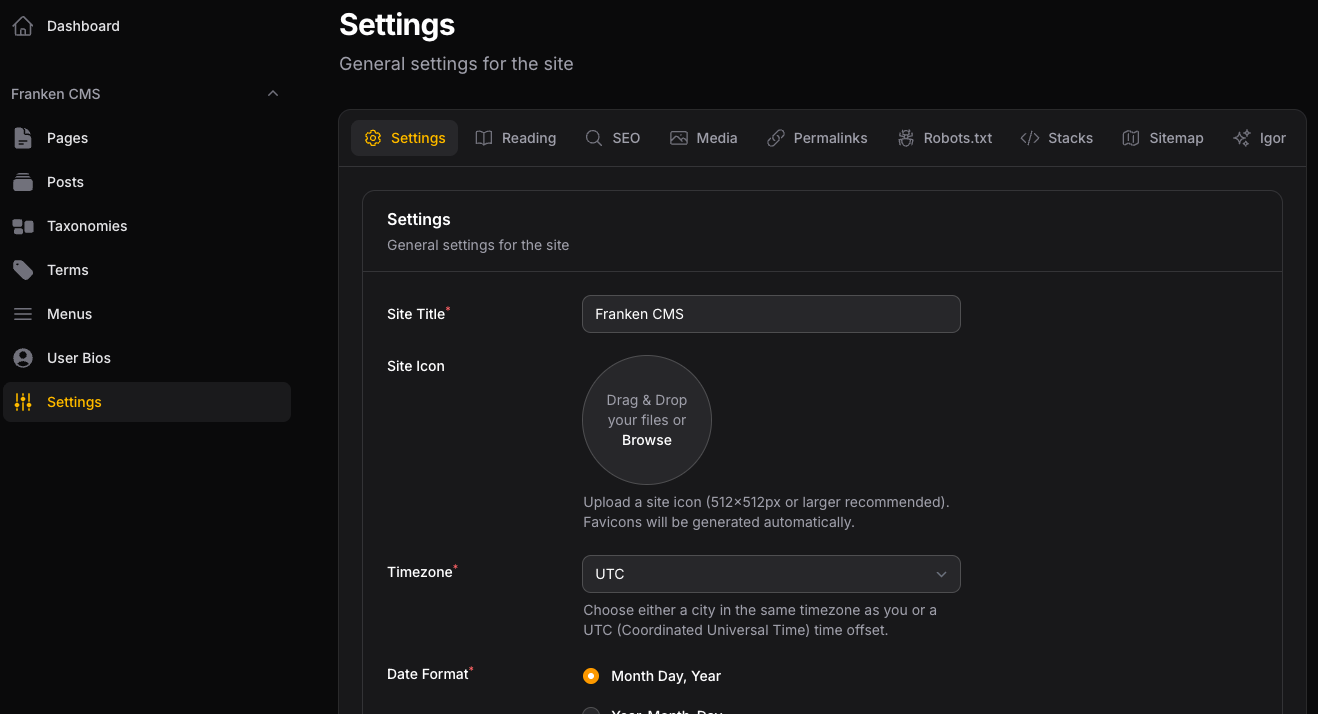
FrankenCMS admin dashboard after a fresh install.
General
- Site title and icon/favicon
- Timezone configuration
- Date and time formats (with custom format support)
Reading
- Homepage and blog page selection
- Posts per page
- RSS/Atom feed toggle and syndication settings
- Default featured image fallback
SEO
- Site name, tagline, and default meta description
- Page title formatting and separator
- Canonical URLs and default robots behavior
- Open Graph defaults (image, type, Facebook App ID)
- Twitter/X card settings
Media
- Featured image aspect ratio and dimensions
- Listing image aspect ratio and dimensions
- Crop settings
- Responsive image generation
Robots.txt
- Enable dynamic
robots.txtgeneration - Discourage search engine indexing
- Per-user-agent rules (allow/disallow directives, crawl delay)
Permalinks
- Permalink structure (common patterns or custom)
- Category and tag base URLs
Sitemap
- Enable XML sitemap generation
- Default change frequency and priority
- Max URLs per sitemap
- Excluded paths and custom sitemaps
- Featured image inclusion
Stacks
- Custom code stacks for injecting scripts, styles, or tracking codes
- Each stack has a label, name, enabled toggle, and code editor
- Output in templates using
@stack('stack-name')
Igor (AI)
Requires the prism-php/prism package (composer require prism-php/prism). Without it, the Igor tab displays installation instructions.
- Enable/disable AI content generation
- Provider and API key configuration (OpenAI, Anthropic)
- Dynamic model selection (fetched from provider API)
- Customizable prompts for SEO titles, meta descriptions, teasers, alt text, image titles, blog posts, and blog post titles
Next Steps
The laboratory is calibrated. Now you can: